Mikrotik SD-WAN
Overview
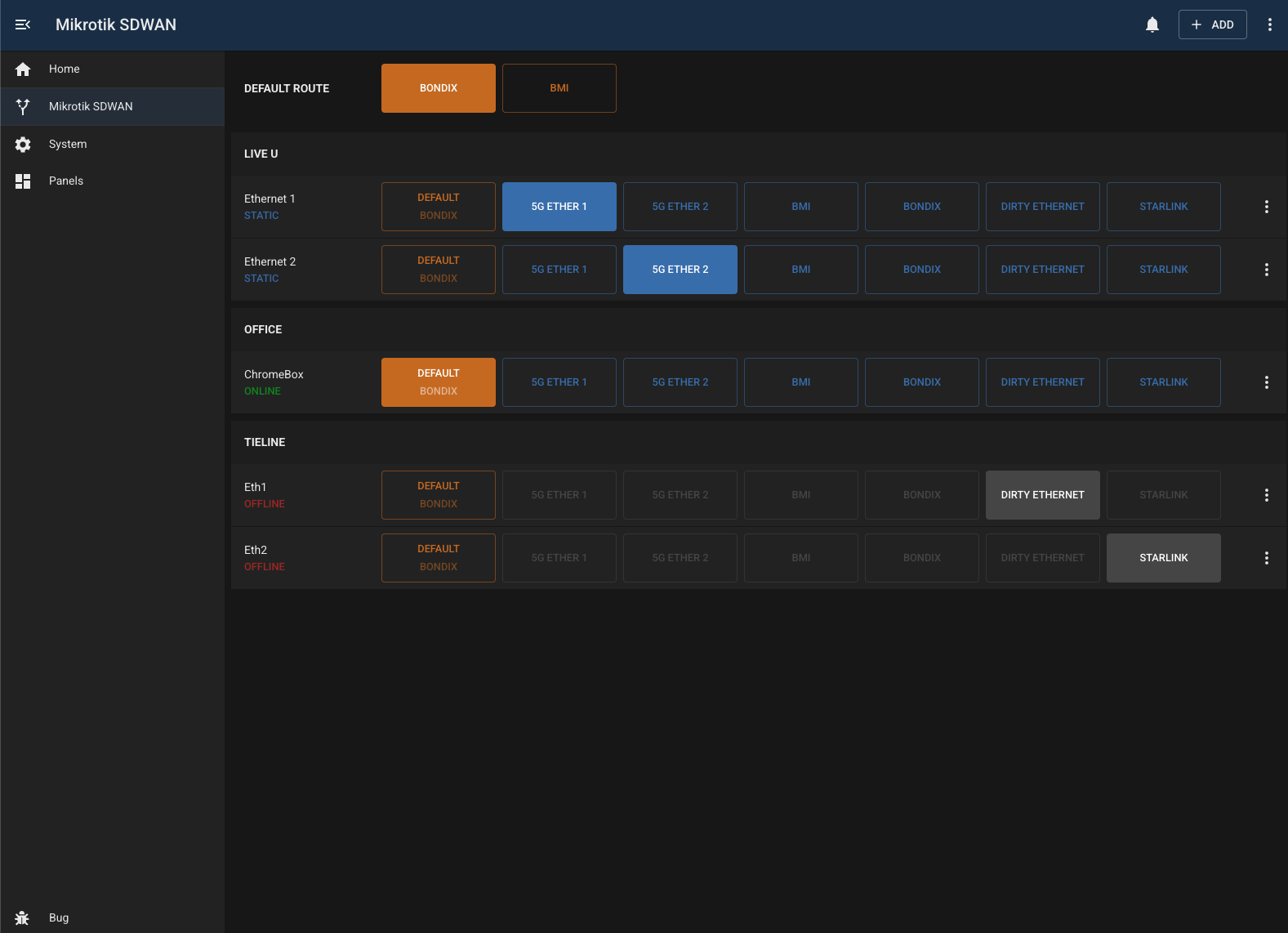
The mikrotik-sdwan module provides simple, rule-based traffic steering on a MikroTik router. It allows users to explicitly choose which WAN a device or service should use, using MikroTik address lists, mangle rules, and routes under the hood.
Leases
IP addresses can be added manually or selected from the router’s DHCP lease list, then organised into logical groups. This makes it easy to manage multi-interface devices such as LiveU units or Tieline gateways, where each interface can be routed independently.
WANs
WANs exposed in the UI are simply MikroTik route tables. Route tables are labelled using their comments on the router; tables without a comment are ignored. Updating a comment immediately updates the label shown in the module.
When a WAN is selected for an IP address, the module creates the required address list entry to steer traffic via the chosen route table. Selecting the default WAN removes this entry, returning traffic to normal routing behaviour. If an IP address was sourced from DHCP, the module also displays whether the lease is currently active.
Default Routes
Lastly, the available (and active) default routes of the main routing table are displayed at the top of the page. Note that this section is READ ONLY.
Configuration
| Field | Default Value | Description |
|---|---|---|
id | "" | Unique identifier for this module instance (usually auto-generated). |
needsConfigured | true | Indicates whether the module has been configured since build. |
title | "" | Human-readable title for this module instance, shown in the UI. |
module | "mikrotik-sdwan" | Internal name of the module. |
description | "" | Optional text describing the module instance in the UI. |
notes | "" | Free-text field for extra notes about this configuration. |
routingTablePrefix | "r-tab" | Prefix used when naming MikroTik routing tables for this module. |
address | "" | IP address or hostname of the MikroTik router to connect to. |
username | "bug" | Username used to authenticate with the MikroTik router. |
password | "" | Password for the router user. |
enabled | false | Flag indicating whether this module instance is active. |
Capabilities
This module follows BUG’s standard capabilities model. For more information, see BUG Capabilities Documentation.
| Type | List |
|---|---|
| Exposes | None |
| Consumes | None |
Troubleshooting
Missing/incorrect WANs
Make sure the routing table prefix is set correctly and your routing tables are named appropriately.
Changelog
version 1.0.16
- 2026-03-04: add display of route status to entry page (c30623e)
- 2026-03-04: add support for subnet routing (38b5ce8)
- 2026-03-04: fix handle extra address list entries (b5c82e2)
- 2026-03-04: fix client error when no wan address (1d27614)
version 1.0.15
- 2026-03-03: match address and mac (c97a6ef)
version 1.0.14
- 2026-03-03: fix setting comment on dynamic lease (c1acad0)
version 1.0.13
- 2026-03-03: fix loopback addresses for ping/wanaddress (595520c)
version 1.0.12
- 2026-02-26: tweak ui colours (ff51611)
version 1.0.11
- 2026-02-26: remove unused ping task (a336027)
- 2026-02-25: fix wan address lookup/ping (af287b8)
- 2026-02-25: use routerOsApi.run to queue messages (c54fdeb)
- 2026-02-25: migrate to node-routeros-v2 (6a0ce6c)
- 2026-02-24: use routeros-api for services (c947a17)
- 2026-02-24: use routeros-api for services (46ebc27)
- 2026-02-23: fix logging levels (6391aa7)
- 2026-02-23: add enabling and disabling of routes (b8a8060)
- 2026-02-23: add ability to clear connections (06120d3)
- 2026-02-23: add ping sparkline, dynamic info and geoip (26997b4)
- 2026-02-23: fix logging levels (d45abec)
- 2026-02-23: add enabling and disabling of routes (d723cb3)
- 2026-02-23: add ability to clear connections (51a78ed)
- 2026-02-23: add ping sparkline, dynamic info and geoip (bbc486f)
- 2026-02-13: add ping/fetch tests and use worker tasks (b851e72)
- 2026-02-13: add ping/fetch tests and use worker tasks (3e667ba)
- 2026-02-11: improve workers when device unavailable (c4d2d25)
- 2026-02-11: use new task-based workers (7400929)
- 2026-02-11: improve workers when device unavailable (b28e169)
- 2026-02-11: use new task-based workers (687ff2b)
- 2026-02-10: fix route comments/labels (6689759)
- 2026-02-10: fix route/group sorting (8131771)
- 2026-02-10: improve default status (77dc294)
- 2026-02-10: fix route comments/labels (9610798)
- 2026-02-10: fix route/group sorting (6dcbdcb)
- 2026-02-10: improve default status (0097e4b)
- 2026-02-09: add default route view (88e292a)
- 2026-02-09: update logging in services (34c6704)
- 2026-02-09: add default route view (a331e15)
- 2026-02-09: update logging in services (03d5774)
- 2026-02-05: improve reliablilty of workers (e84bdfb)
- 2026-02-05: improve logging in workers (0104578)
- 2026-02-05: improve reliablilty of workers (01aa4f1)
- 2026-02-05: improve logging in workers (c6f8767)
- 2026-01-26: fix empty entries list (7358cd3)
- 2026-01-26: added module (952ad15)
version 1.0.10
- 2026-02-25: fix wan address lookup/ping (ce4965a)
- 2026-02-25: use routerOsApi.run to queue messages (17a9047)
- 2026-02-25: migrate to node-routeros-v2 (379b539)
- 2026-02-24: use routeros-api for services (15fe548)
- 2026-02-23: fix logging levels (d8cba86)
- 2026-02-23: add enabling and disabling of routes (03750e1)
- 2026-02-23: add ability to clear connections (0e50f13)
- 2026-02-23: add ping sparkline, dynamic info and geoip (5d86ba7)
- 2026-02-13: add ping/fetch tests and use worker tasks (5e99191)
- 2026-02-11: improve workers when device unavailable (e6e33c8)
- 2026-02-11: use new task-based workers (2632dff)
- 2026-02-10: fix route comments/labels (a70227e)
- 2026-02-10: fix route/group sorting (c7d3312)
- 2026-02-10: improve default status (0b2e515)
- 2026-02-09: add default route view (0191836)
- 2026-02-09: update logging in services (ae0b8f4)
- 2026-02-05: improve reliablilty of workers (afd0a5d)
- 2026-02-05: improve logging in workers (38d8690)
version 1.0.2
- 2026-01-26: fix empty entries list (c2f2697)
version 1.0.1
- 2026-01-26: added module (0e10483)