Arista Switch
Overview
A module to control and monitor Arista AOS network switches.
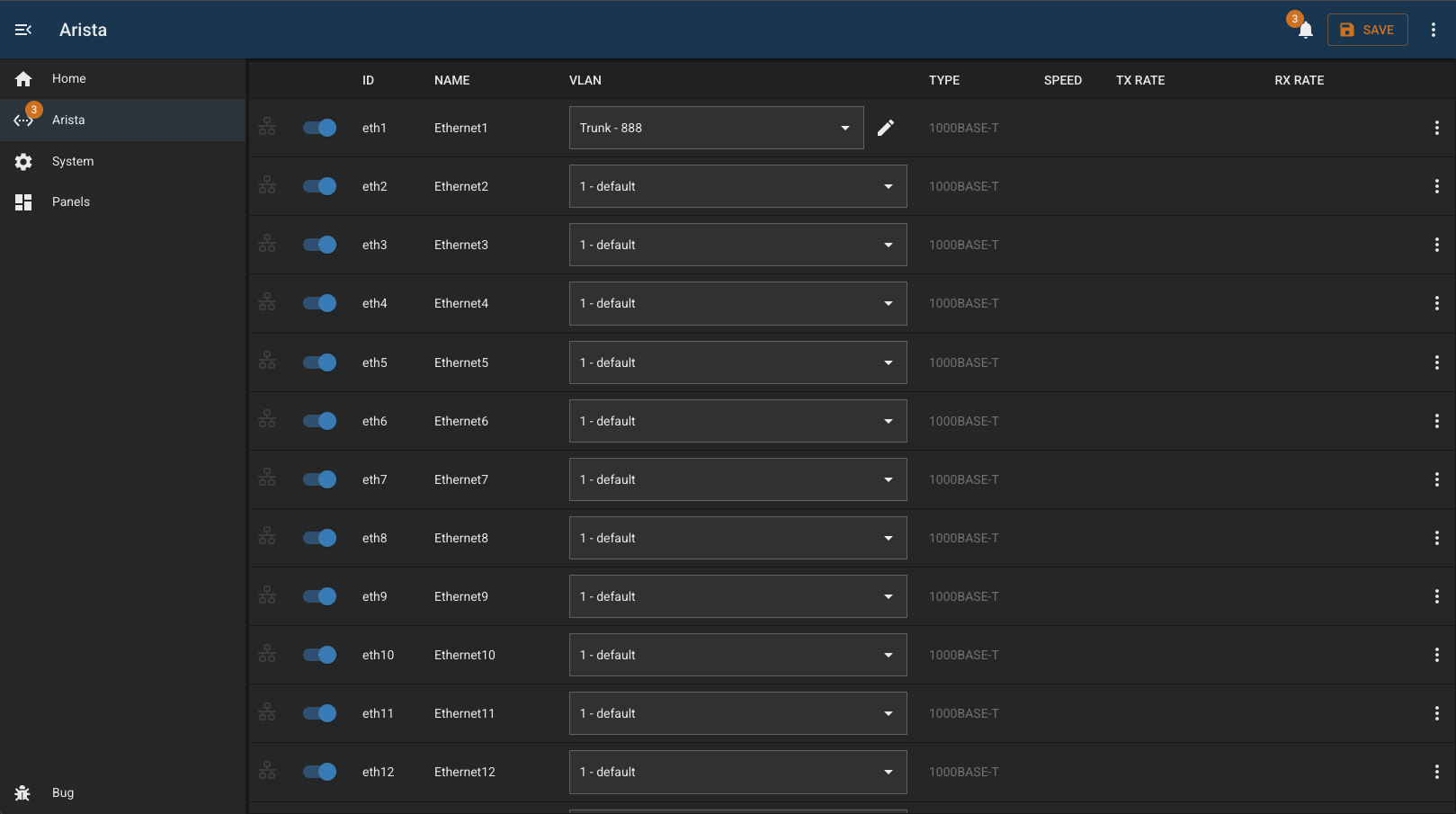
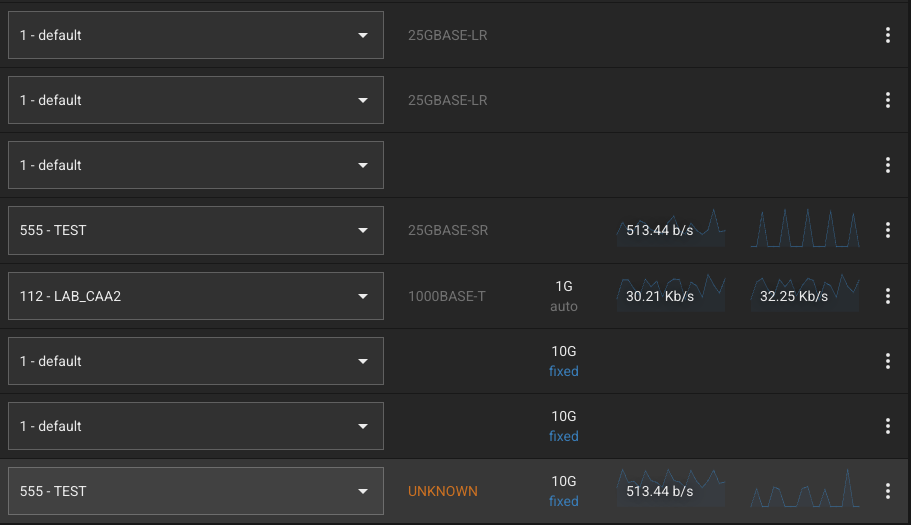
Interface list features:
- list of interfaces with bitrate (and recent historical stats)
- ability to enable/disable ports
- view POE status and control power
- add description to interface (click on the name to edit)
- select VLAN, including editing of trunk or access mode
- display of interface rate (1G/100M)
- ablity to ‘protect’ ports to prevent accidental changes (useful for uplinks etc) - stored locally in BUG
- display of neighbors and/or known devices (LLDP or FDB)
- configurable DHCP address source to convert discovered MAC addresses to IP
- displays if any ports are in ‘error-disabled’ state
Interface page features:
- more detailed view of interface
- statistics graph for last few minutes
- neighbor details (LLDP)
- devices tab (FDB) with optional IP lookup
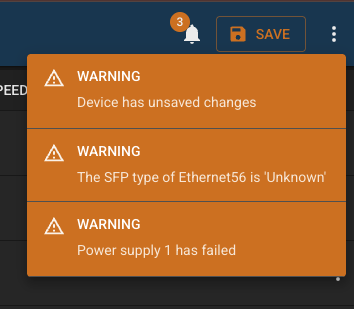
Also polls the switch to check if there are pending changes and prompts to save if there are.
Device Status
This module provides a BUG status endpoint. Read the Bug Documentation for more information.
| Type | Description |
|---|---|
error | Checks contents of interfaces collection in db |
warning | Checks contents of VLANs collection in db |
warning | Checks contents of system information collection in db |
warning | Checks error disabled state of interfaces |
warning | Checks if device has unsaved changes |
warning | Checks status of device power supplies |
warning | Checks any SFPs in an ‘unknown’ state |
Configuration
| Field | Default Value | Description |
|---|---|---|
id | "" | Unique identifier for this module instance (usually auto-generated). |
needsConfigured | true | Indicates whether the module has been configured since build. |
title | "" | Human-readable title for this module instance, shown in the UI. |
module | "arista-switch" | Internal name of the module. |
description | "" | Optional text describing the module instance in the UI. |
notes | "" | Free-text field for extra notes about this configuration. |
enabled | false | Whether the module instance is enabled |
address | "" | IP address or hostname of the device to connect to. |
username | "bug" | Username used to authenticate with the device |
password | "" | Password for the user |
enabled | false | Flag indicating whether this module instance is active. |
protectedInterfaces | [] | An of array of interfaces which are ‘protected’ |
dhcpSources | [] | An of array panel IDs which provide the dhcp server capability |
Capabilities
This module follows BUG’s standard capabilities model. For more information, see BUG Capabilities Documentation.
| Type | List |
|---|---|
| Exposes | None |
| Consumes | dhcp-server |
Device Configuration
- Create a username/password with write access - used for all API access
- Enable API access by adding the following config:
management api http-commands
   protocol https
   no shutdown
Check the configuration with this:
show management api http-commands
You should see something like:
- Enabled: Yes
- Protocol: HTTPS
- VRF: management
Troubleshooting
Changelog
version 1.2.6
- 2026-02-23: fix async code in protect/unprotect (1d6045f)
- 2026-02-06: improve service logging (1a43550)
- 2026-02-03: show poe info in details tab (b8551f9)
- 2026-02-03: add panel status (9cffcd6)
- 2026-02-03: set save pending flag on changes (e699963)
- 2026-02-03: improve api error handling (67e0c70)
- 2026-02-03: improve error handling in utils (b42fe40)
- 2026-02-03: add visiblity and control of POE status (c51a720)
- 2026-02-03: add temperature monitoring and alerts (4b874b4)
- 2026-02-02: refactor workers to reduce memory (fea38a5)
version 1.2.5
- 2026-02-23: fix async code in protect/unprotect (56a7f78)
- 2026-02-06: improve service logging (f7be880)
- 2026-02-03: show poe info in details tab (5250644)
- 2026-02-03: add panel status (367cc3a)
- 2026-02-03: set save pending flag on changes (4b6ff0d)
- 2026-02-03: improve api error handling (b1a551e)
- 2026-02-03: improve error handling in utils (35e8281)
version 1.2.4
- 2026-02-23: fix async code in protect/unprotect (9955d9c)
version 1.2.3
- 2026-02-06: improve service logging (971b2eb)
version 1.2.2
- 2026-02-03: show poe info in details tab (4373b97)
- 2026-02-03: add panel status (cc3d0f7)
- 2026-02-03: set save pending flag on changes (7812227)
- 2026-02-03: improve api error handling (158ef50)
- 2026-02-03: improve error handling in utils (17fa0c0)
- 2026-02-03: add visiblity and control of POE status (83768da)
- 2026-02-03: add temperature monitoring and alerts (77b9cfb)
version 1.2.1
- 2026-02-02: refactor workers to reduce memory (faee8f1)
version 1.1.1
- 2024-03-08: add check for power supply
version 1.0.1
- 2023-07-19: tidy interface warnings